


آموزش ساخت بازی Flappy Bird
22 خرداد 1405
حسین
29 بازدید
4دقیقه
آنچه در این مقاله میخوانید [پنهانسازی]
تا حالا دوست داشتی بازی معروف Flappy Bird رو خودت بسازی؟
در این پروژه یاد میگیریم چطور با استفاده از آردوینو، نمایشگر OLED و یک دکمه، پرندهای بسازیم که با هر بار فشار دادن دکمه پرواز کند و از بین موانع عبور کند. همچنین با مفاهیمی مثل حرکت، امتیازگیری، تشخیص برخورد و برنامهنویسی بازی آشنا میشویم.
آنچه یاد میگیریم:
- کار با نمایشگر OLED
- کنترل اشیا با دکمه
- ساخت بازی ساده با آردوینو
- امتیازدهی و تشخیص برخورد
شماتیک سیم کشی پروژه
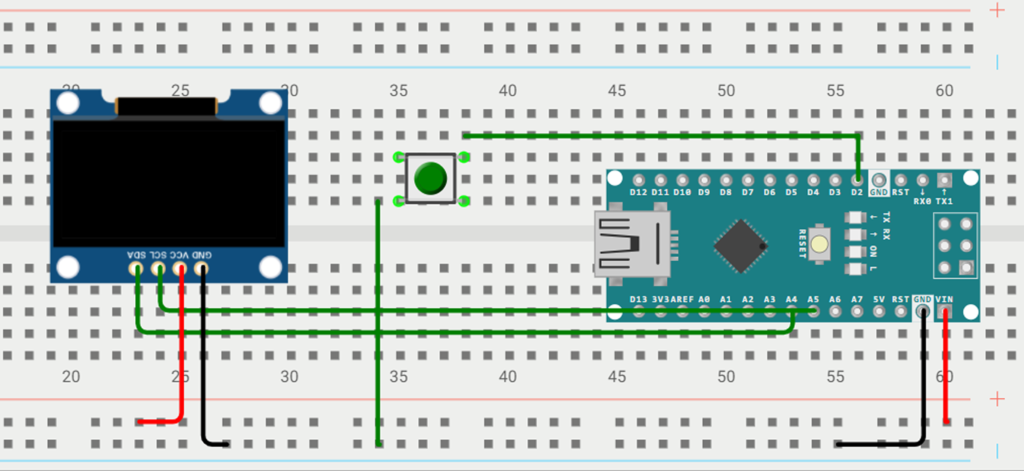
کد های پروژه ( فقط کافیه از بخش پایین کپی کنی و استفاده کنی )
					#include <Adafruit_GFX.h>
#include <Adafruit_SSD1306.h>

#define SCREEN_WIDTH 128
#define SCREEN_HEIGHT 64
#define OLED_RESET -1 // Reset pin not needed
Adafruit_SSD1306 display(SCREEN_WIDTH, SCREEN_HEIGHT, &Wire, OLED_RESET);

// Bird parameters
#define BIRD_X 20
#define BIRD_WIDTH 8
#define BIRD_HEIGHT 8
#define FLAP_FORCE -2
#define GRAVITY 1

int birdY = SCREEN_HEIGHT / 2;
int birdVelocity = 0;

// Pipe parameters
#define PIPE_WIDTH 5
#define GAP_HEIGHT 20
#define PIPE_COUNT 3 // Display three pipes at once
int pipeX[PIPE_COUNT] = {SCREEN_WIDTH, SCREEN_WIDTH + SCREEN_WIDTH/PIPE_COUNT, SCREEN_WIDTH + 2*(SCREEN_WIDTH/PIPE_COUNT)};
int pipeGapY[PIPE_COUNT];

// Game and input parameters
#define BUTTON_PIN 2
bool game_over = false;
int score = 0;

// Bird bitmap
const uint8_t PROGMEM birdBitmap[] = {
0x00, 0x28, 0x1C, 0x1B, 0x1C, 0x28, 0x00, 0x00
};

void setup() {
  pinMode(BUTTON_PIN, INPUT_PULLUP);
  display.begin(SSD1306_SWITCHCAPVCC, 0x3C);
  display.clearDisplay();
  display.display();

  // Initialize random heights for pipe gaps
  initializePipes();
}

void loop() {
  if (!game_over) {
    // Button input detection
    if (digitalRead(BUTTON_PIN) == LOW) {
      birdVelocity = FLAP_FORCE;
    }

    // Update bird position
    birdY += birdVelocity;
    birdVelocity += GRAVITY;

    // Update position of each pipe
    for (int i = 0; i < PIPE_COUNT; i++) {
      pipeX[i] -= 2;
      if (pipeX[i] < -PIPE_WIDTH) {
        pipeX[i] = SCREEN_WIDTH;
        // Set different gap height for new pipe
        pipeGapY[i] = generateUniqueGapHeight(i);
        score++;
      }

      // Collision detection
      if (pipeX[i] < BIRD_X + BIRD_WIDTH && pipeX[i] + PIPE_WIDTH > BIRD_X &&
          (birdY < pipeGapY[i] || birdY + BIRD_HEIGHT > pipeGapY[i] + GAP_HEIGHT)) {
        game_over = true;
      }
    }

    // Clear display and draw the next frame
    display.clearDisplay();
    display.drawBitmap(BIRD_X, birdY, birdBitmap, BIRD_WIDTH, BIRD_HEIGHT, SSD1306_WHITE);
    for (int i = 0; i < PIPE_COUNT; i++) {
      display.fillRect(pipeX[i], 0, PIPE_WIDTH, pipeGapY[i], SSD1306_WHITE);
      display.fillRect(pipeX[i], pipeGapY[i] + GAP_HEIGHT, PIPE_WIDTH, SCREEN_HEIGHT - pipeGapY[i] - GAP_HEIGHT, SSD1306_WHITE);
    }
    display.setCursor(0, 0);
    display.setTextSize(1);
    display.setTextColor(SSD1306_WHITE);
    display.print("Score: ");
    display.print(score);
    display.display();

    // Control update rate
    delay(30);
  } else {
    // Game over display
    display.clearDisplay();
    display.setCursor(10, 20);
    display.setTextSize(2);
    display.setTextColor(SSD1306_WHITE);
    display.print("Game Over");
    display.setCursor(20, 45);
    display.setTextSize(1);
    display.print("Score: ");
    display.print(score);
    display.display();
    delay(2000);
    // Reset game
    resetGame();
  }
}

void resetGame() {
  birdY = SCREEN_HEIGHT / 2;
  birdVelocity = 0;
  initializePipes();
  score = 0;
  game_over = false;
}

void initializePipes() {
  for (int i = 0; i < PIPE_COUNT; i++) {
    pipeX[i] = SCREEN_WIDTH + i * (SCREEN_WIDTH / PIPE_COUNT);
    pipeGapY[i] = generateUniqueGapHeight(i);
  }
}

int generateUniqueGapHeight(int currentPipe) {
  int gapHeight;
  bool isUnique;
  do {
    gapHeight = random(GAP_HEIGHT + 10, SCREEN_HEIGHT - GAP_HEIGHT - 10);
    isUnique = true;
    for (int j = 0; j < currentPipe; j++) {
      if (pipeGapY[j] == gapHeight) {
        isUnique = false;
        break;
      }
    }
  } while (!isUnique);
  return gapHeight;
}
